

Subscribing to Events
Recipe to show how a developer can subscribe to the configurator-lite native events to expand on the functionality
Almost every event that we use internally within the project can be subscribed to from an external source and the way to get a hold of the event dispatcher is via the API (except for the coreReady event, which is documented at the bottom of this page):
const epigraphAppEvents = EPIGRAPH_CONFIGURATOR.api.getAppEvents();The object that we store above, has access to all the events that you could possibly need. Every event should be listed as a property of this object, like shown in the image below:
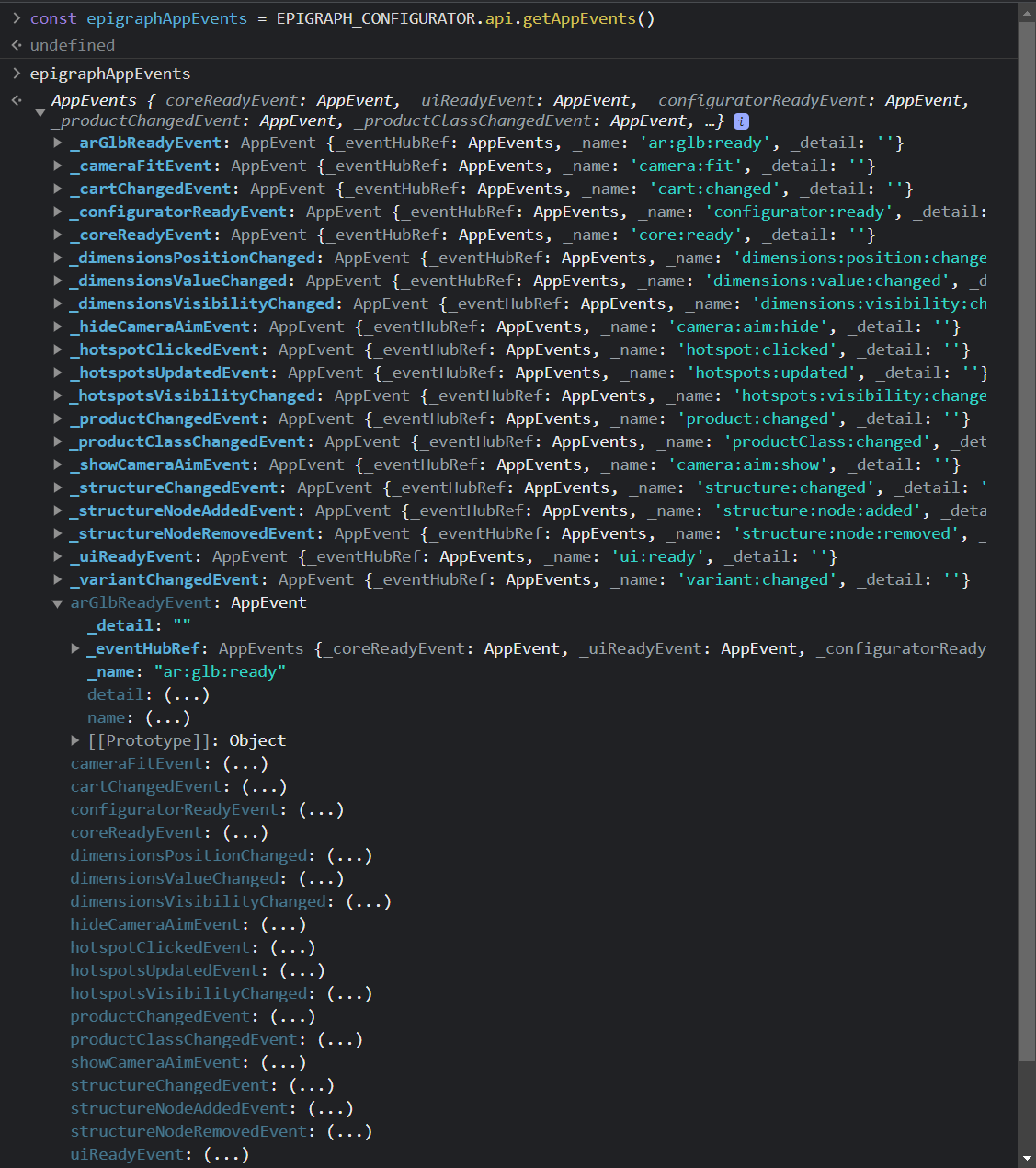
In general, this is how you would be subscribing to most of the events:
const epigraphAppEvents = EPIGRAPH_CONFIGURATOR.api.getAppEvents();
epigraphAppEvents.addEventListener(
      epigraphAppEvents.event01.name,
  		()=>{
        console.log("Do Something");
      }
);
The "core:ready" event is an exception because it may need to be subscribed to, even before the API or the core is ready for use. That is the reason why we elevate this event to the window object as well. Here is how you can subscribe to it:
window.addEventListener(
	"core:ready",
  ()=>{
    // Here you could execute tasks like, updating product pricing, populating a custom UI if need be.
    console.log("Processes that need to happend once the core is ready");
  }
);
Updated over 1 year ago